
You may see the error message below in your tests if you have a MOCA command or a Web API step that takes longer than 60 seconds to complete.
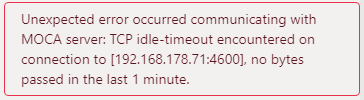
This error message is due to Cycle expecting a response from the MOCA server or the Web API endpoint within 60 seconds of sending the command. If the MOCA server or Web API endpoint has not responded within the default 60 seconds, Cycle will fail the step.
This default 60 second response time can be extended using a configuration file. Please note that this timeout configuration update will apply to all steps expecting a server response.
To extend the default timeout period follow the steps below on the device where Cycle is running:
1. Create a new file call ed " akka-config-overrides.conf" in the directory " C:/Users/ /AppData/Roaming/Cycle/config"
C:/Users/ /AppData/Roaming/Cycle/config/akka-config-overrides.conf
2. Copy and paste the contents below in bold text into the file.
Please note that the uncommented example will extend the timeout to 5 minutes.There are also commented examples to show how to adjust the time in seconds or to apply an infinite timeout period.You can set the value of " akka.http.host-connection-pool.client.idle-timeout" according to the needs in your environment.
File contents:# this will keep http connections open up to 5 minutes when receiving no data.akka.http.host-connection-pool.client.idle-timeout = 5 min# or you can specify time in seconds# akka.http.host-connection-pool.client.idle-timeout = 180 s# or you can keep connections open indefinitely# akka.http.host-connection-pool.client.idle-timeout = infinite
3. Restart Cycle.